Ok,
So this are the 3 stories that I pick from digg to post this week. Enjoy
Wal-mart
Wireless TV
Metro picnic
In the last one I have no idea what is going on. I like the technology in the second news. Just imagine get home, turn on your tv and start using it as your laptop monitor without having to connect any cables, that would be sweet.
Friday, August 31, 2007

Monday, August 27, 2007
Coming Soon, And this time I mean it.
Well I'm starting to do things a little bit different, and I'm starting to feel confident I can do something worth on this space. Starting this Wednesday I will be introducing 3 new periodic sections on my blog.
On Mondays I will publish, "This week on the Scientific Journals." I will start talking about some articles worth reading on a few scientific journals. As expected this articles will somehow related to my field.
On Wednesdays; "Visual GSL" I will be giving a brief progress on my visual GSL project. I hope I will be able to make the program available to anyone who find some use for it.
Finally on Fridays; "My top 3 Digg.com stories of the week." After a long week is time to relax so I will be publishing my favorite 3 digg stories of the week.
I hope you will find something in here that you will enjoy.
On Mondays I will publish, "This week on the Scientific Journals." I will start talking about some articles worth reading on a few scientific journals. As expected this articles will somehow related to my field.
On Wednesdays; "Visual GSL" I will be giving a brief progress on my visual GSL project. I hope I will be able to make the program available to anyone who find some use for it.
Finally on Fridays; "My top 3 Digg.com stories of the week." After a long week is time to relax so I will be publishing my favorite 3 digg stories of the week.
I hope you will find something in here that you will enjoy.
Sunday, August 26, 2007
MBP will delete your work!
I should have learned the lesson by now. If you are going to carry a USB thumb drive with all your work on it, MAKE A COPY!!!
When I get my thumb drive on December everything was great, I made a copy of all my code on it, after that I just start working on top of it. I would carry it everywhere and if I had a brilliant idea away from home I could just ssh into one of my accounts, code, compile, save results and keep going.
In the middle of march I lost such a small piece of technology. And what a big annoyance it became, losing all that work in 5 seconds just doesn't seem fair. Lucky enough I found it the next weekend. And I made a mental note, "don't loose it again."
When I move on June to a new department I though I had lost it again. Wow saving half a year on such a small device and make no copies of it just seems stupid. Well it is. After one week or so I finally found it, I was relieve. I made a mental note, "make a copy."
Finally the wait was over, my mac book pro arrived, right on my birthday July 12th, that was a nice present, and finally after a few days of installing applications I got a nice system to work on. Took my usb thumb drive and plug it right next to the mag-safe power adapter the mac book pro sports. I know if I put the mag-safe close enough to a magnetic device it will delete its data. But I believed it should be fine since apple put the usb port right next to it. (Put usb device on usb port)

While the mag-safe didn't manage to destroy all my work it did actually manage to delete one of the programs I was working on along with some data. I guess this time I learned my lesson since this time I didn't made a mental note but take action making a backup of everything on the drive.
I will try to get in the habit of posting things on here. In the mean while enjoy this picture I took of my mac mini crashing.

When I get my thumb drive on December everything was great, I made a copy of all my code on it, after that I just start working on top of it. I would carry it everywhere and if I had a brilliant idea away from home I could just ssh into one of my accounts, code, compile, save results and keep going.
In the middle of march I lost such a small piece of technology. And what a big annoyance it became, losing all that work in 5 seconds just doesn't seem fair. Lucky enough I found it the next weekend. And I made a mental note, "don't loose it again."
When I move on June to a new department I though I had lost it again. Wow saving half a year on such a small device and make no copies of it just seems stupid. Well it is. After one week or so I finally found it, I was relieve. I made a mental note, "make a copy."
Finally the wait was over, my mac book pro arrived, right on my birthday July 12th, that was a nice present, and finally after a few days of installing applications I got a nice system to work on. Took my usb thumb drive and plug it right next to the mag-safe power adapter the mac book pro sports. I know if I put the mag-safe close enough to a magnetic device it will delete its data. But I believed it should be fine since apple put the usb port right next to it. (Put usb device on usb port)

While the mag-safe didn't manage to destroy all my work it did actually manage to delete one of the programs I was working on along with some data. I guess this time I learned my lesson since this time I didn't made a mental note but take action making a backup of everything on the drive.
I will try to get in the habit of posting things on here. In the mean while enjoy this picture I took of my mac mini crashing.

Thursday, August 9, 2007
I will be back soon.
I just moved to a new apartment. But now I'm getting ready to continue with all my crazy ideas, I have a few new ones. I will be back real soon.
Wednesday, June 27, 2007
New Computer is on its way.
I have been really busy last weeks, so I leave my blog and the crazy
projects on a side. I'm buying a new apple computer, this time is a
brand new mac book pro. I can't wait until the machine finally arrives.
In the meanwhile I have to keep working on my mac mini at home and mylinux laptop at school. Once I get the new computer I have to learn the xgrid framework, so I can make my programs run on both, the mini and the pro at the same time.
projects on a side. I'm buying a new apple computer, this time is a
brand new mac book pro. I can't wait until the machine finally arrives.
In the meanwhile I have to keep working on my mac mini at home and mylinux laptop at school. Once I get the new computer I have to learn the xgrid framework, so I can make my programs run on both, the mini and the pro at the same time.
Saturday, May 26, 2007
This Blog is getting boring!!!
I know, I know. There is no news I'm my blog in over two weeks now. Well nobody reads it anyway, but I feel like starting my blog to post my achievements so maybe one day someone will read about them.
At this moment I have a fair amount of projects I want to start. Unfortunately I don't have the time, energy or money to do all of them, on top of doing full time research, and taking care of my plants. Here is a list of the projects I want to start, Anyone of this projects is enough to keep me away from any other in the list so I will have to make some decisions:
1) Learn Cocoa and Objective C.
Well, since apple have been stealing my soul since the very moment I buy my mac mini I want to develop applications with graphical interface for my personal use, and make them available if anyone else have any use for them.
2) Find a place to Live.
This is kind of obvious why I need to do this.
3) Implement a console window via usb.
I have an extra monitor, check.
I have a computer that doesn't handle dual displays, check.
I use the terminal in my mac a lot, check.
Can I connect my second monitor to my mac and have a full screen terminal on it via usb, nope.
Do I know any device on the market that will do this for me, not that I know of.
Can I do it myself, maybe.
4) Visual GSL.
For my own research I have been using the GSL (GNU Scientific Library) and it is really a nice library for what I do. But I would like to make a graphical implementation of it so I can test if the method will work the way I want it to work. And then it have to generate the code for me the code for me.
For example I have to calculate some Greens functions making a Hilbert transform from the non-interacting electronic density. In doing so I have to allow for an imaginary part on the self-energy. And I find myself coding things like:
gsl_complex var = gsl_complex_add_real(gsl_complex_add(sigma1,sigma2),mu);
witch only means var = sigma1+sigma2+mu; where var, sigma1 and sigma2 are complex numbers. It would be nice to do a little program where I can input sigma1+sigma2+mu, and I can copy paste the generated code to my program.
5) Poker odds.
I have been watching poker on television for a while, and played some games (no real money involved) online, and it's fun. So I would like to code a program that will tell me what are the best hands to start with. And I know AA is the best hand you can start with, but I what about for example, J-10 suited vs Q-K off suite.
6) Learn openGL.
This will help me to make plots for my programs in number 4 with in the same program with only adding a button, plot.
7) Infinite desks.
I can't talk about this.
8) Learn to use Xmgrace.
My advisor suggested I have to discard gnuplot and use xmgrace instead.
9) Write on my own blog.
As you can see I have a lot of things I want to embrace and the day only have 24 hours. I will try to keep posting things here on a regular basis.
-Chuy
At this moment I have a fair amount of projects I want to start. Unfortunately I don't have the time, energy or money to do all of them, on top of doing full time research, and taking care of my plants. Here is a list of the projects I want to start, Anyone of this projects is enough to keep me away from any other in the list so I will have to make some decisions:
1) Learn Cocoa and Objective C.
Well, since apple have been stealing my soul since the very moment I buy my mac mini I want to develop applications with graphical interface for my personal use, and make them available if anyone else have any use for them.
2) Find a place to Live.
This is kind of obvious why I need to do this.
3) Implement a console window via usb.
I have an extra monitor, check.
I have a computer that doesn't handle dual displays, check.
I use the terminal in my mac a lot, check.
Can I connect my second monitor to my mac and have a full screen terminal on it via usb, nope.
Do I know any device on the market that will do this for me, not that I know of.
Can I do it myself, maybe.
4) Visual GSL.
For my own research I have been using the GSL (GNU Scientific Library) and it is really a nice library for what I do. But I would like to make a graphical implementation of it so I can test if the method will work the way I want it to work. And then it have to generate the code for me the code for me.
For example I have to calculate some Greens functions making a Hilbert transform from the non-interacting electronic density. In doing so I have to allow for an imaginary part on the self-energy. And I find myself coding things like:
gsl_complex var = gsl_complex_add_real(gsl_complex_add(sigma1,sigma2),mu);
witch only means var = sigma1+sigma2+mu; where var, sigma1 and sigma2 are complex numbers. It would be nice to do a little program where I can input sigma1+sigma2+mu, and I can copy paste the generated code to my program.
5) Poker odds.
I have been watching poker on television for a while, and played some games (no real money involved) online, and it's fun. So I would like to code a program that will tell me what are the best hands to start with. And I know AA is the best hand you can start with, but I what about for example, J-10 suited vs Q-K off suite.
6) Learn openGL.
This will help me to make plots for my programs in number 4 with in the same program with only adding a button, plot.
7) Infinite desks.
I can't talk about this.
8) Learn to use Xmgrace.
My advisor suggested I have to discard gnuplot and use xmgrace instead.
9) Write on my own blog.
As you can see I have a lot of things I want to embrace and the day only have 24 hours. I will try to keep posting things here on a regular basis.
-Chuy
Monday, May 7, 2007
Tutorial: Make Latex ready plots using gnuplot.
Gnuplot is a free yet easy to use command line plotter for the Linux OS. You can also install it on Mac OS X and Windows. If you are using Mac OS X and want the OS X feel in your plots you can type
>set terminal aqua
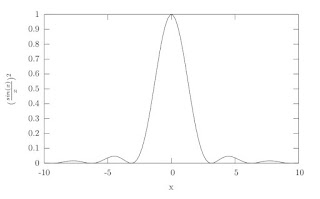
With gnuplot you can either plot data files or functions, in this case we will plot (sin(x)/x)^2, first we want to plot it and make sure we get the right plot.
1) open gnuplot and type
>plot (sin(x)/x)**2
2) Make a new file i.e. plot.txt and open it in any text editor, add the lines
set terminal epslatex
set output "myplot.eps"
This two lines will tell gnuplot that the output file has to be an encapsulated postscript (eps) with name myplot.eps, now you can add to the file the plot you want to make.
set key off
set xlabel '$x$'
set ylabel '$(\frac{sin(x)}{x})^{2}$'
plot (sin(x)/x)**2
First set the options of your plot, xlabel, ylabel, etc, and then input the plot command. Note that you can input data in the latex commands and latex will translate that to actual formatted text equations. Now you can save the file.
3) In the terminal type the command
>gnuplot plot.txt
You will notice two new files in your directory. myplot.eps and myplot.tex
4) If you already have a tex document you insert your new plot on it. First make sure you have the following two lines in the headers of your tex file;
\usepackage{graphicx}
\usepackage{epstopdf}
gnuplot warns you about adding the first one but not the second one in the help pages.
now just place your graphic with the command, \input{myplot}
5) Or you could also compile myplot.tex file directly only a few modifications are needed, first open myplot.tex and add the following lines
\documentclass[14pt]{article}
\usepackage{graphicx}
\usepackage{epstopdf}
\begin{document}
skip the rest of the text and locate the last line
\endinput
and delete it. Finally add the line
\end{document}
And that is it, now you just need to compile your tex document to make it a pdf. Sometimes pdflatex have problems making the plot when both files have the same name myplot.tex & myplot.eps, in such a case, change the name of the eps file. i.e. othername.eps and change the line in myplot.tex
\includegraphics{myplot}
to
\includegraphics{./othername.eps}
Cheers.
>set terminal aqua
With gnuplot you can either plot data files or functions, in this case we will plot (sin(x)/x)^2, first we want to plot it and make sure we get the right plot.
1) open gnuplot and type
>plot (sin(x)/x)**2
2) Make a new file i.e. plot.txt and open it in any text editor, add the lines
set terminal epslatex
set output "myplot.eps"
This two lines will tell gnuplot that the output file has to be an encapsulated postscript (eps) with name myplot.eps, now you can add to the file the plot you want to make.
set key off
set xlabel '$x$'
set ylabel '$(\frac{sin(x)}{x})^{2}$'
plot (sin(x)/x)**2
First set the options of your plot, xlabel, ylabel, etc, and then input the plot command. Note that you can input data in the latex commands and latex will translate that to actual formatted text equations. Now you can save the file.
3) In the terminal type the command
>gnuplot plot.txt
You will notice two new files in your directory. myplot.eps and myplot.tex
4) If you already have a tex document you insert your new plot on it. First make sure you have the following two lines in the headers of your tex file;
\usepackage{graphicx}
\usepackage{epstopdf}
gnuplot warns you about adding the first one but not the second one in the help pages.
now just place your graphic with the command, \input{myplot}
5) Or you could also compile myplot.tex file directly only a few modifications are needed, first open myplot.tex and add the following lines
\documentclass[14pt]{article}
\usepackage{graphicx}
\usepackage{epstopdf}
\begin{document}
skip the rest of the text and locate the last line
\endinput
and delete it. Finally add the line
\end{document}
And that is it, now you just need to compile your tex document to make it a pdf. Sometimes pdflatex have problems making the plot when both files have the same name myplot.tex & myplot.eps, in such a case, change the name of the eps file. i.e. othername.eps and change the line in myplot.tex
\includegraphics{myplot}
to
\includegraphics{./othername.eps}

Cheers.
Subscribe to:
Posts (Atom)

